

Agents and MCP Servers
Agents can be made available as tools within MCP servers, allowing MCP servers to leverage agent capabilities when called by other agents.
Publishing Agents for Use in MCP Servers
When you publish an agent to be callable, it becomes available as a tool that MCP servers can use. This enables MCP servers to orchestrate complex workflows by calling specialized agents.
Making Your Agent Available
-
Navigate to your agent’s Publish tab
-
Enable the Callable toggle in the Agents and MCP Servers section to make your agent available as a tool
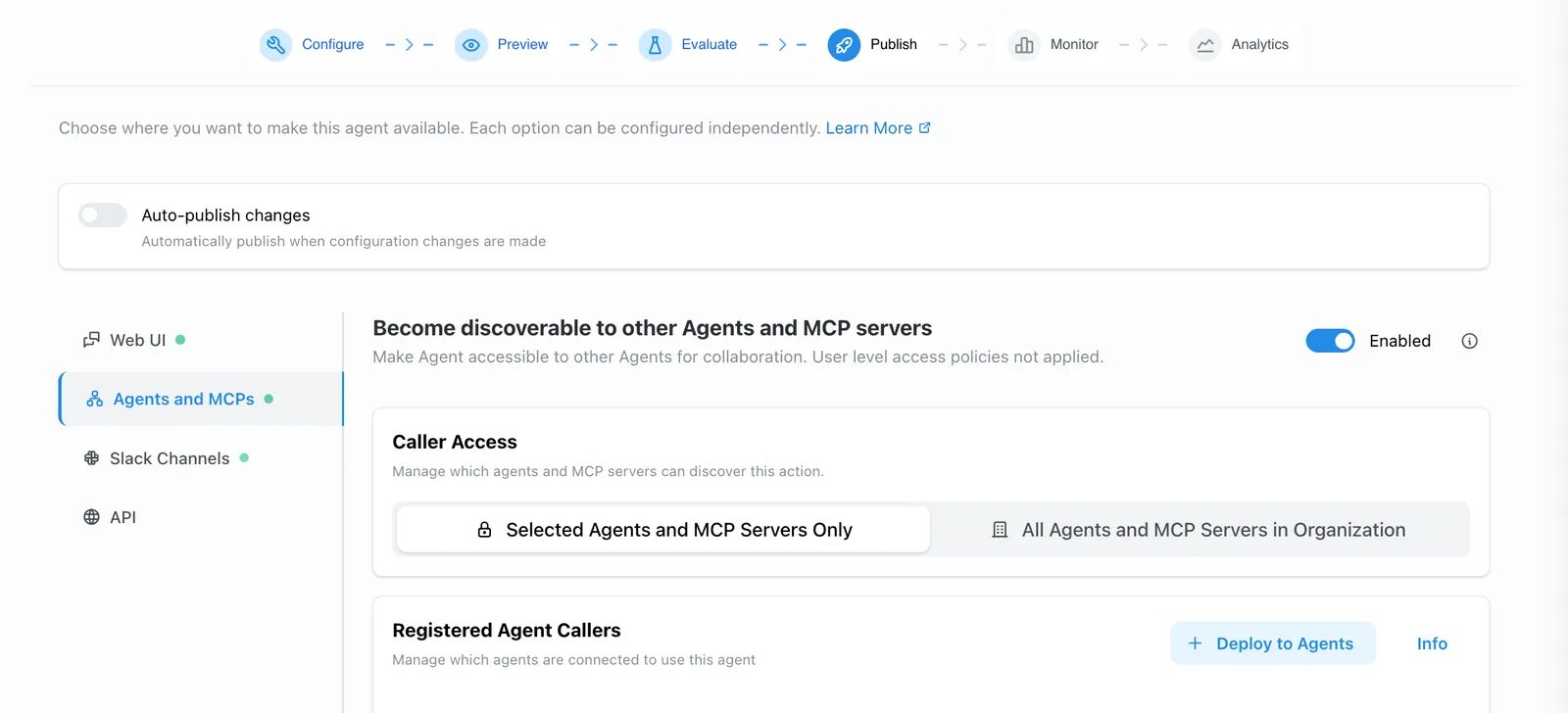
-
Configure access permissions:
Option 1: All Agents (Admin Only)
- Makes your agent available to any MCP server or orchestrator in your organization
- Only organization admins can select this option
- Best for widely-useful agents like document search or data analysis
Option 2: Specific Callers
- Add specific MCP servers or agents as eligible callers
- Provides granular control over which systems can call your agent
- Best for specialized or sensitive agents
-
Write a clear Description explaining:
- What tasks or questions this agent handles
- What data sources or systems it has access to
- Any limitations or special considerations
- Example use cases for when to call this agent
How MCP Servers Use Published Agents
Once an agent is published as callable:
- MCP server builders can see the agent in their available tools list
- They can add the agent as a tool in their MCP server configuration
- When the MCP server is called by another agent, it can invoke your published agent as needed
- The agent executes the task and returns results to the MCP server, which then returns them to the calling agent
Agent Collaboration
For information about making agents discoverable to other agents (orchestrator-subagent pattern), see Agent Collaboration.
Best Practices
- Clear Descriptions: Write detailed descriptions so MCP server builders understand when and how to use your agent
- Focused Purpose: Keep agents specialized—each agent should do one thing well
- Appropriate Access: Use specific caller access when you need fine-grained control
- Test Integration: After publishing, test your agent when called through an MCP server to ensure it behaves as expected
- Document Parameters: If your agent expects specific input formats, document them clearly in the description