

For AI agents: a documentation index is available at the root level at /llms.txt and /llms-full.txt. Append /llms.txt to any URL for a page-level index, or .md for the markdown version of any page.
System StatusStart using Credal
  • Getting Started
    • Introduction
    • Quickstart
    • Video: Agent Building Basics
    • FAQs
  • Platform
        • Setting Up An Agent
        • Choosing a Model
        • Writing Instructions
          • Overview
          • Data
          • Actions
            • Overview
            • Smart Filtering (beta)
            • Collection Schemas
            • AI Entity Extraction (beta)
            • Bring Your Own Custom Data Sources
          • Credal MCP Servers
        • Agent Collaboration
        • Memory and Feedback
      • Testing Your Agent
    • Bulk Analysis
LogoLogo
System StatusStart using Credal
PlatformAgent BuilderConfigurationAdd ConnectorsDocument Collections

Collection Schemas

Was this page helpful?
Edit this page
Previous

AI Entity Extraction (beta)

Next
Built with

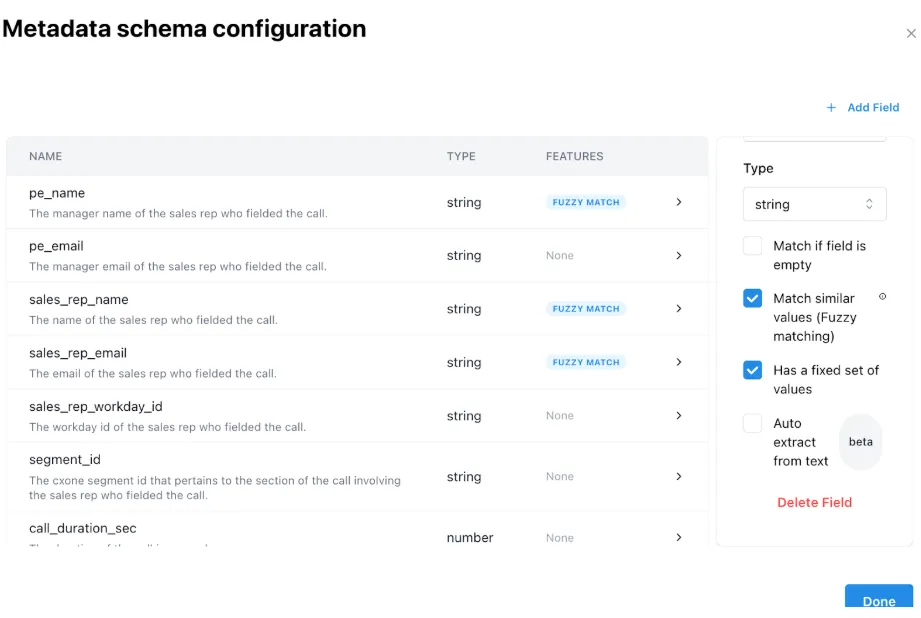
Collection schemas describe the expected structure of a set of documents, or a set of entities that you’d want associated with each individual document for filtering purposes. Schemas are used by Smart Filtering to narrow search results to the most relevant documents.

For example, a set of sales call transcripts could have a Client Name field. A schema is a way to specify the expected structure to Credal so that we can filter data and only send the relevant pieces of information to the LLM. They can be specified by pressing the Add Schema button on any document collection and specifying the expected fields and their type.

If you specify that a field “Has a fixed set of values”, then for metadata that is NOT AI Entity Extracted, Credal will automatically determine the set of possible values at query time. If there are a large number of entities, Credal may not be able to determine the set of values and may skip this step.
Metadata Schema Configuration.png